
Engagement Growth Calculator
Discover how much your website traffic can grow by improving engagement!
Projected Monthly Traffic
Projected Yearly Traffic
Traffic Increase
Ready to boost your WordPress blog engagement? Click below to get started!
1. Enter Your Current Traffic
Add the number of visitors your site gets each month.
2. Set Your Engagement Rates
Input your current engagement rate (e.g., clicks, interactions) and choose your desired rate.
3. View Your Growth Projections
See how much your traffic could grow with improved engagement.
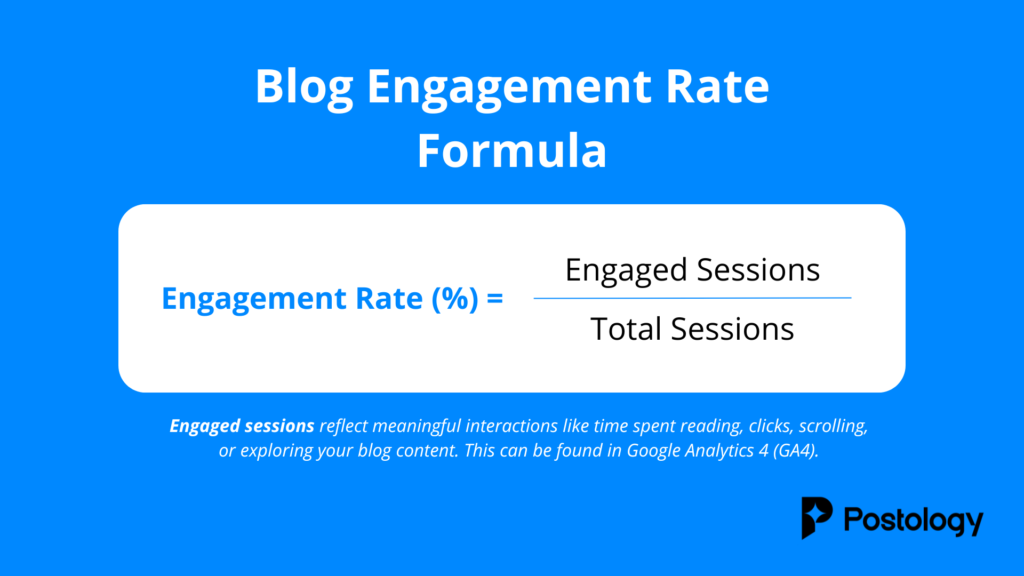
What Is the Blog Engagement Rate?
Your blog engagement rate measures how actively your audience interacts with your content. It’s calculated as a percentage of your total visitors who perform actions like clicking, commenting, sharing, or staying engaged for longer periods.
A high engagement rate means your content resonates with your audience, keeps them interested, and encourages them to take action. It’s one of the most important metrics for understanding how well your blog is performing.
What Is a Good Blog Engagement Rate?
When you calculate your potential traffic growth, it’s important to understand what the results mean and how they compare to industry benchmarks.
-
Low Engagement Rate (1-3%)
This is common for newer blogs or sites with broad, untargeted audiences. Focus on creating audience-specific, valuable content to improve. -
Moderate Engagement Rate (4-6%)
A solid rate that suggests your readers find your content relevant. Small improvements like better CTAs or visuals can make a big difference. -
High Engagement Rate (7% and Above)
Excellent performance! Your content connects with your audience, and they’re actively engaging. Focus on scaling your content strategy to drive even more traffic.
Tip: Compare your results to your past performance rather than others. Tracking your improvement over time is the best way to measure success.
Where to Find My Current Blog Engagement
1. Use Google Analytics
Google Analytics is a powerful tool for tracking blog performance. To calculate your engagement rate, start by locating these key metrics:
- Page Views: The total number of views on your blog posts.
- Bounce Rate: The percentage of visitors who leave without interacting with your content.
- Average Session Duration: How long visitors spend on your blog.
- Scroll Depth (if enabled): How far down visitors scroll on your pages.
For more details on how user engagement is tracked, visit the official Google Analytics Help page: GA4 User Engagement – Google Analytics Help
2. Use WordPress Analytics Plugins
If your blog is hosted on WordPress, analytics plugins can provide engagement insights directly from your dashboard. Popular options include:
- Jetpack: Tracks post views, clicks, and visitor behavior.
- MonsterInsights: Integrates Google Analytics and displays engagement metrics for blog posts.
- Scroll Depth Plugins: Plugins like ExactMetrics can measure how far readers scroll through your content.
These tools make it easy to monitor engagement without leaving your blog platform.
Boost Your Blog Engagement by 20%, Instantly
Install Postology on your WordPress blog and elevate your content with quick summaries that captivate and retain readers.